Create a MSI Setup with WiX Toolset v6
The WiX (Windows Installer XML) toolset is used to build MSI packages for your software. You can add a .wixproj beside your main C# projects and define what you want to be installed, where you want it and even if you want to create shortcuts for your software. The generated MSI package can be built in an automated process, like the DevOps CI build pipe.
With WiX v6 the toolset is fully NuGet-based and uses an SDK-style project (WixToolset.Sdk). There is no separate installer or WIX environment variable anymore. The old candle.exe / light.exe compiler and linker as well as the standalone heat.exe harvester are replaced by MSBuild tasks that run automatically during the build.
Getting started
Install the tools
No separate WiX installer is needed. The toolset is pulled in as a NuGet SDK package when you build:
1
<Project Sdk="WixToolset.Sdk/6.0.2">
The WixToolset.Heat package is added as a PackageReference for auto-harvesting:
1
<PackageReference Include="WixToolset.Heat" Version="6.0.2" />
Optional VS extension: You can install the WiX v4+ VS Extension for syntax highlighting and project templates.
Create a Project
Create a new WiX v6 Setup project (.wixproj) in your existing solution. This creates a project with a Product.wxs file that describes the setup process, the components and everything else needed to create the MSI package.
Because WiX v6 is fully integrated into MSBuild you can build the setup with Visual Studio or with dotnet build / msbuild on the command line and in CI pipelines.
wxs file and content
The MSI package contains so called Features. Features contain Component Groups, the groups contain Components and all of this can be separated in Fragments.
If you activate and use UI dialogs, you can let the user decide if features should be installed or not (not explained here yet).
Setup Project content
The Product.wxs file contains the <Package> element (WiX v6 replaces the old v3 <Product> + <Package> pair with a single <Package>). The Name attribute holds the product name of your software. The Manufacturer attribute won’t change very often, so it can be hardcoded. The UpgradeCode is a fixed GUID set for each setup; it identifies the product for the OS so it knows this exact product and must stay the same for each new version. The OS compares this and the version number to decide if the install process is an upgrade or to prevent downgrades.
Variable definitions
The needed variables are defined at the top of the Product.wxs file to improve maintainability. In WiX v6, the build-output and project paths are no longer injected via project references. Instead they are defined as DefineConstants in the .wixproj file and referenced with $(var.Product.TargetDir) and $(var.Product.ProjectDir):
1
2
3
4
5
6
7
8
<!-- define dynamic variables here -->
<?define ProductManufacturer="Hermann Otto GmbH" ?>
<?define PackageDescription="WiX Installer EDU Project" ?>
<?define ProductTargetDir=$(var.Product.TargetDir) ?>
<?define ProductProjectIconDir=$(var.Product.ProjectDir) ?>
<?define ProductTargetExe="WixInstallerEDU.exe" ?>
<?define ProductVersion="!(bind.FileVersion.MainExeFile)" ?>
<?define ProductHelpLink=https://dev.azure.com/YOURCOMPANY/Ausbildung/_git/WixInstallerEDU?>
The next part determines for which environment the setup should be built. This is controlled via the environment variable SETUP_ENVIRONMENT, either set locally on the developer machine or in the CI build pipe on DevOps. The CI env variable can be set within the CI pipe as shown in my other articles. To set a local env var on your dev machine you can use [System.Environment]::SetEnvironmentVariable('SETUP_ENVIRONMENT','DEVELOPMENT',[System.EnvironmentVariableTarget]::User) (Note: This is case sensitive).
This part sets dynamic values to build the single setup project upgradable for each environment and customizes it with icons and shortcuts:
1
2
3
4
5
6
7
8
9
10
11
12
13
14
15
16
17
18
19
20
21
22
23
24
25
26
<!-- set environment dependent values -->
<?ifdef env.SETUP_ENVIRONMENT?>
<!-- DEVELOPMENT -->
<?if $(env.SETUP_ENVIRONMENT)=DEVELOPMENT?>
<?define ProductName="WixInstallerEDU.DEVELOPMENT" ?>
<?define ShortcutName="WixInstallerEDU - DEVELOPMENT" ?>
<?define UpgradeCodeGUID="{9682658F-AD3E-414E-BD27-228B3B2B37DD}" ?>
<?define ApplicationShortcutGUID="{01E478D8-A4FE-4138-B945-6030B774B6BE}" ?>
<?define DesktopShortcutGUID="{D8F54CD5-8267-4137-8147-7CF706B141F4}" ?>
<?endif?>
<!-- BETA -->
<?if $(env.SETUP_ENVIRONMENT)=BETA?>
<?define ProductName="WixInstallerEDU.BETA" ?>
<?define ShortcutName="WixInstallerEDU - BETA" ?>
<?define UpgradeCodeGUID="{1DBABF4D-4263-4711-A909-561A949F0F75}" ?>
<?define ApplicationShortcutGUID="{079DE843-1B8C-49F6-8DF7-63E0EE873FF7}" ?>
<?define DesktopShortcutGUID="{F1D19ABD-4454-46C1-9A4B-B95A75B9DD87}" ?>
<?endif?>
<?else?>
<!-- PRODUCTION -->
<?define ProductName="WixInstallerEDU" ?>
<?define ShortcutName="WixInstallerEDU" ?>
<?define UpgradeCodeGUID="{16F1754E-C22F-4266-81FD-EBB841911566}" ?>
<?define ApplicationShortcutGUID="{DD9E215A-0BE0-4E63-A02F-48F0D196A474}" ?>
<?define DesktopShortcutGUID="{101DFDA8-1EAC-4718-B9C4-7B1EE0022323}" ?>
<?endif?>
This uses the preprocessor checks of the WiX toolset: WiX Preprocessor Docs
You need fixed GUIDs for the UpgradeCode and the shortcut resources, to properly install and uninstall independently. In WiX v6 the Package Code is auto-generated on each build, which is fine for major upgrades. Only the UpgradeCode must be fixed for the Windows Installer to recognize the installed product.
Package element and MajorUpgrade
In WiX v6 the <Package> element replaces the old v3 <Product> and <Package> combination. The MajorUpgrade element is used with Schedule="afterInstallInitialize" for proper upgrade handling:
1
2
3
4
5
6
7
8
9
<Package Name="$(var.ProductName)"
         Language="1033"
         Version="$(var.ProductVersion)"
         Manufacturer="$(var.ProductManufacturer)"
         UpgradeCode="$(var.UpgradeCodeGUID)"
         Scope="perMachine">

    <MajorUpgrade Schedule="afterInstallInitialize"
                  DowngradeErrorMessage="A newer version of [ProductName] is already installed." />
Pack the MSI to single file
The MSI would have a cab archive file per default, but with the <MediaTemplate EmbedCab="yes" /> setting the cab archive will be built within the MSI package to only have a single output file.
AppIcon and links
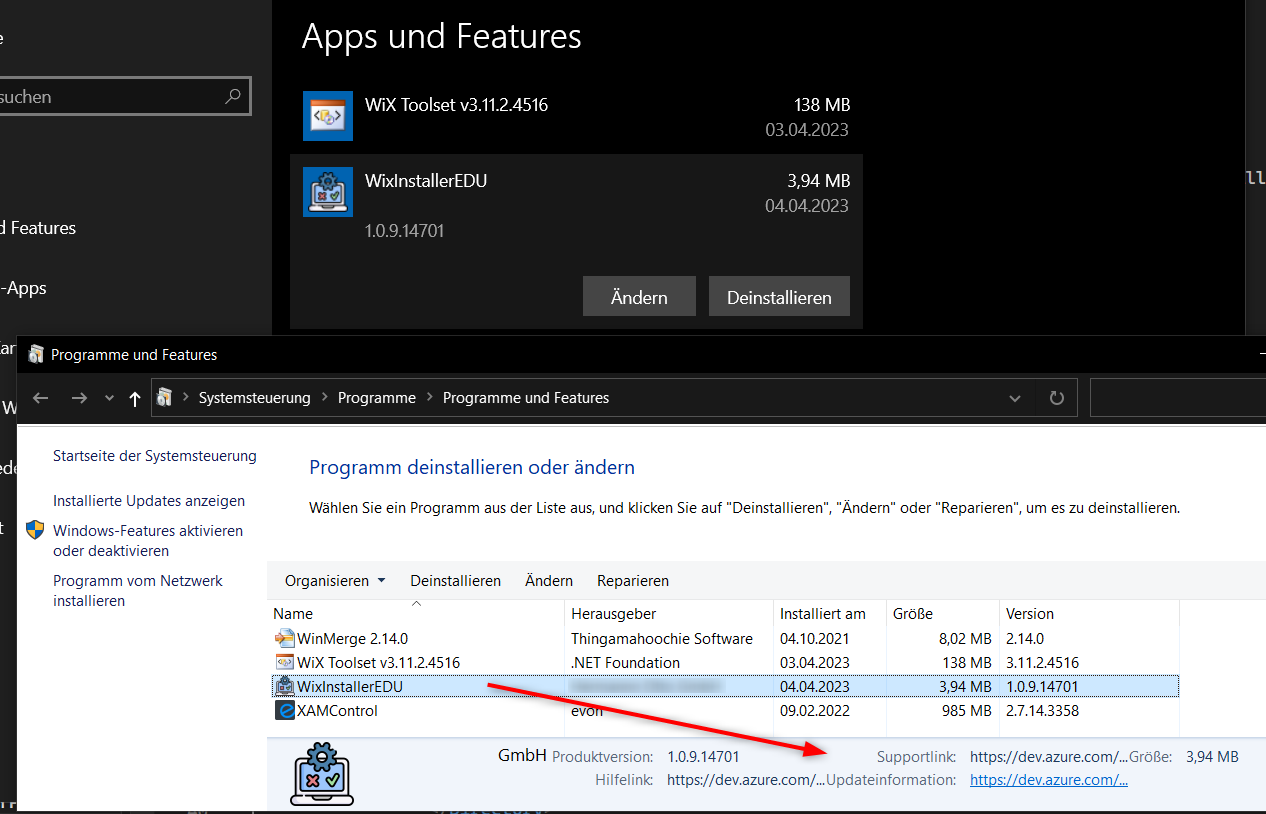
If you have an icon file for you application, you can add it to be displayed in the OS “Programs and Features” dialog. The setup can also contain help links for further information ($(var.ProductHelpLink) is defined on the top of the file):
1
2
3
4
5
6
7
8
9
10
11
12
13
14
15
16
17
18
19
20
<!-- Conditional Block checking if env var exists and if it has specific value for changing the Shortcut name -->
<!-- This only sets a icon for the programmed application UI, not for the shortcut or the start menu -->
<?ifdef env.SETUP_ENVIRONMENT?>
<?if $(env.SETUP_ENVIRONMENT)=DEVELOPMENT?>
<Icon Id="AppIcon" SourceFile="$(var.ProductProjectIconDir)Resources\Dev.ico" />
<Property Id="ARPPRODUCTICON" Value="AppIcon" />
<?endif?>
<?if $(env.SETUP_ENVIRONMENT)=BETA?>
<Icon Id="AppIcon" SourceFile="$(var.ProductProjectIconDir)Resources\Beta.ico" />
<Property Id="ARPPRODUCTICON" Value="AppIcon" />
<?endif?>
<?else?>
<Icon Id="AppIcon" SourceFile="$(var.ProductProjectIconDir)Resources\Prod.ico" />
<Property Id="ARPPRODUCTICON" Value="AppIcon" />
<?endif?>

<!-- Provide information links to be displayed in "Programs and Features" -->
<Property Id="ARPURLINFOABOUT"  Value="$(var.ProductHelpLink)" />
<Property Id="ARPHELPLINK"      Value="$(var.ProductHelpLink)" />
<Property Id="ARPURLUPDATEINFO" Value="$(var.ProductHelpLink)" />
Directories and Shortcut placement
The next part defines the directories where you want to install your software. WiX v6 introduces the <StandardDirectory> element which replaces the old manual <Directory Id="TARGETDIR"> tree. Standard directories are referenced by well-known ids and automatically resolve to the correct language-independent paths. The platform (x64) is derived from the project settings so the 64-bit Program Files folder is used automatically:
1
2
3
4
5
6
7
8
9
10
11
12
13
14
15
16
17
18
19
20
21
22
23
24
25
26
27
28
29
30
31
32
33
34
35
36
37
38
39
40
41
42
43
44
45
46
47
48
49
50
51
52
53
54
55
56
57
58
59
60
61
62
63
64
65
<!-- Directories -->
<Fragment>
    <!-- Program Files Folder -->
    <!-- StandardDirectory uses the 64-bit folder because Platform is x64 -->
    <!-- https://docs.firegiant.com/wix/schema/wxs/standarddirectory/ -->
    <StandardDirectory Id="ProgramFiles64Folder">
        <Directory Id="MANUFACTURERFOLDER" Name="!(bind.property.Manufacturer)">
            <Directory Id="INSTALLFOLDER" Name="!(bind.property.ProductName)" />
        </Directory>
    </StandardDirectory>
    <!-- Start Menu Folder -->
    <StandardDirectory Id="ProgramMenuFolder">
        <Directory Id="ApplicationProgramsFolder" Name="!(bind.property.ProductName)" />
    </StandardDirectory>
    <!-- Desktop Shortcut -->
    <StandardDirectory Id="DesktopFolder" />
</Fragment>

<!-- Provide application and uninstall shortcuts in the start menu -->
<Fragment>
	<ComponentGroup Id="ApplicationShortcuts">
		<Component Id="ApplicationShortcuts"
					Guid="$(var.ApplicationShortcutGUID)"
					Directory="ApplicationProgramsFolder">
			<Shortcut Id="ApplicationShortcut"
						Name="$(var.ShortcutName)"
						Description="Starts $(var.ShortcutName)"
						Target="[INSTALLFOLDER]$(var.ProductTargetExe)"
						WorkingDirectory="INSTALLFOLDER" />
			<Shortcut Id="UninstallShortcut"
						Name="Uninstall !(bind.property.ProductName)"
						Description="Uninstalls !(bind.property.ProductName)"
						Target="[System64Folder]msiexec.exe"
						Arguments="/x [ProductCode]" />
			<RegistryValue Root="HKCU"
							Key="Software\!(bind.property.Manufacturer)\!(bind.property.ProductName)"
							Name="ApplicationShortcutsInstalled"
							Type="integer"
							Value="1"
							KeyPath="yes" />
			<RemoveFolder Id="ApplicationProgramsFolder" On="uninstall" />
		</Component>
	</ComponentGroup>
</Fragment>

<!-- Create a Desktop Shortcut -->
<Fragment>
	<ComponentGroup Id="ApplicationDesktopShortcut">
		<Component Id="ApplicationDesktopShortcut"
					Guid="$(var.DesktopShortcutGUID)"
					Directory="DesktopFolder">
			<Shortcut Id="ApplicationDesktopShortcut"
						Name="$(var.ShortcutName)"
						Description="$(var.ShortcutName)"
						Target="[INSTALLFOLDER]$(var.ProductTargetExe)"
						WorkingDirectory="INSTALLFOLDER" />
			<RegistryValue Root="HKCU"
							Key="Software\!(bind.property.Manufacturer)\!(bind.property.ProductName)"
							Name="ApplicationDesktopShortcutInstalled"
							Type="integer"
							Value="1"
							KeyPath="yes" />
		</Component>
	</ComponentGroup>
</Fragment>
The registry entries ensure to have the KeyPath="yes" attribute, which is used to check if these resources are installed or not. The KeyPath attribute check is used by the installer for repair commands or updates of your software. The shortcut and link resources have to be environment dependent with separated GUIDs to be installed and uninstalled side-by-side.
Dynamic harvesting with HarvestDirectory (replaces heat.exe)
In WiX v6 the old heat.exe CLI tool is replaced by the HarvestDirectory MSBuild item provided by the WixToolset.Heat NuGet package. The harvester is declared directly in the .wixproj file and runs automatically at build time — no PreBuildEvent call to heat.exe is needed for harvesting anymore:
1
2
3
4
5
6
7
8
9
10
11
12
13
14
<ItemGroup>
    <PackageReference Include="WixToolset.Heat" Version="6.0.2" />
</ItemGroup>

<ItemGroup>
    <HarvestDirectory Include="$(ProductTargetDir)"
                      ComponentGroupName="ProductComponents"
                      DirectoryRefId="INSTALLFOLDER"
                      PreprocessorVariable="var.Product.TargetDir"
                      SuppressCom="true"
                      SuppressRegistry="true"
                      SuppressRootDirectory="true"
                      Transforms="Transforms.xslt" />
</ItemGroup>
This generates the ProductComponents component group from the build output directory automatically on every build. All DLLs and runtime files are captured without having to maintain them manually.
The Transforms attribute applies the Transforms.xslt stylesheet to the harvested output to filter out files that are added manually or should not be included (see Transforming the XML for excluding files).
Note: Unlike WiX v3, no intermediate
ProductComponents.wxsfile needs to be committed to source control and no.gitignoreentry is needed for it.
Environment-specific configuration files
The PreBuildEvent in the .wixproj handles copying environment-specific configuration files to the generic names expected by the installer. This ensures the correct SomeSettings.json and appsettings.json are included in the MSI for each environment:
| Environment | SETUP_ENVIRONMENT |
SomeSettings source | appsettings source |
|---|---|---|---|
| PRODUCTION | (not set) | SomeSettings.Production.json |
appsettings.json |
| BETA | BETA |
SomeSettings.BETA.json |
appsettings.json |
| DEVELOPMENT | DEVELOPMENT |
SomeSettings.Development.json |
appsettings.Development.json |
The source files are copied to SomeSettings.json and appsettings.json in the build output directory before harvesting. All SomeSettings.*.json and appsettings.*.json variants are then excluded from auto-harvesting via Transforms.xslt, and the generic files are added back as manually defined components in Product.wxs:
1
2
3
4
5
6
7
8
9
10
11
12
13
14
15
16
17
<!-- SomeSettings.json: environment-specific file copied by PreBuildEvent -->
<Fragment>
    <ComponentGroup Id="ServersettingsJsonComponentGroup" Directory="INSTALLFOLDER">
        <Component Id="SomeSettingsJsonComp" Guid="{8B5A3F12-4B7C-4D9E-A2F1-3C8D7E6B5A4F}">
            <File Id="SomeSettingsJsonFile" KeyPath="yes" Source="$(var.ProductTargetDir)SomeSettings.json" />
        </Component>
    </ComponentGroup>
</Fragment>

<!-- appsettings.json: base configuration file -->
<Fragment>
    <ComponentGroup Id="AppsettingsJsonComponentGroup" Directory="INSTALLFOLDER">
        <Component Id="AppsettingsJsonComp" Guid="{2F3A8B5C-1D4E-4F6A-9B2C-7E8D3A5F1B4C}">
            <File Id="AppsettingsJsonFile" KeyPath="yes" Source="$(var.ProductTargetDir)appsettings.json" />
        </Component>
    </ComponentGroup>
</Fragment>
Optional Features
You can define some Components or even ComponentGroups as additional/optional Features:
1
2
3
4
5
6
7
8
9
10
11
12
13
14
<!-- List of features with their components to be installed -->
<Feature Id="ProductFeature" Title="$(var.ProductName).Setup" Level="1">
    <ComponentGroupRef Id="MainExeComponentGroup" />
    <ComponentGroupRef Id="ServersettingsJsonComponentGroup" />
    <ComponentGroupRef Id="AppsettingsJsonComponentGroup" />
    <ComponentGroupRef Id="ProductComponents" />
    <ComponentGroupRef Id="ApplicationShortcuts" />
    <ComponentGroupRef Id="ApplicationDesktopShortcut" />
</Feature>

<!-- optional additional feature to be installed if chosen -->
<Feature Id="OptionalFeatures" Title="OptionalFeatures.Setup" Level="2" Description="install optional Features.">
    <ComponentGroupRef Id="OptionalFeaturesComponents" />
</Feature>
The OptionalFeatures have a lower Level than the default level 1, so they are not installed by default. You can change the default installation level to 3 with <Property Id="INSTALLLEVEL" Value="3" />. Every feature which is above this level will not be installed by default then.
A possible approach to have optional feature components is to auto-harvest the minimum files and exclude optional files by name with Transforms.xslt. Then add the needed files manually in a ComponentGroup and as non-default Features again.
If you choose to not have a GUI installer, then you can add the installation of these features with the console call:
msiexec /i WixInstallerEDU.Setup.msi ADDLOCAL=ProductFeature,OptionalFeatures
GUI
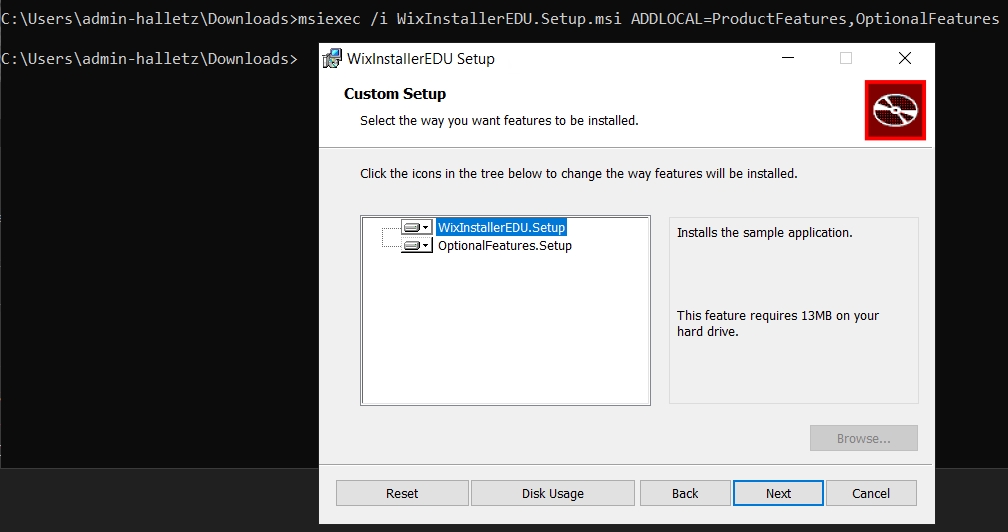
For a minimalistic GUI you can enable some prebuilt dialogs in the Product.wxs file. Check the WiX v6 documentation for available dialog sets: WiX UI Dialog Library
Versioning
To sync the version we read the version number from the main exe file. This file is manually added as a separate Fragment, Component Group and Component and gets a certain Id to be referenced by the !(bind.FileVersion.MainExeFile) binder variable in the variable definitions at the top of Product.wxs:
1
2
3
4
5
6
7
8
9
<!-- manually added exe file to get the version number -->
<!-- other components will be auto-harvested by HarvestDirectory at build time -> ProductComponents component group -->
<Fragment>
    <ComponentGroup Id="MainExeComponentGroup" Directory="INSTALLFOLDER">
        <Component Id="MainExeComponent" Guid="{F63DFDB3-6C46-46E0-97FA-729C035A5B6F}">
            <File Id="MainExeFile" KeyPath="yes" Source="$(var.ProductTargetDir)$(var.ProductTargetExe)" />
        </Component>
    </ComponentGroup>
</Fragment>
The project uses Nerdbank.GitVersioning (configured in Directory.Build.props and version.json) so the assembly and file version are derived from Git automatically.
Transforming the XML for excluding files
The Transforms.xslt contains XSLT transformation rules that filter the auto-harvested component list before the setup build process processes it. Files that are added manually (the main .exe, config files) or that should not be shipped (.pdb files) are removed from the harvested output.
The following keys are defined in Transforms.xslt:
| Key | Matches | Purpose |
|---|---|---|
ExeToRemove |
Components with .exe files |
The main exe is added manually in MainExeComponentGroup |
SomeSettingsToRemove |
Components with files containing SomeSettings. in the path |
The correct environment-specific file is added manually |
appsettingsToRemove |
Components with files containing appsettings. in the path |
The correct environment-specific file is added manually |
PdbToRemove |
Components with .pdb files |
Debug symbols should not be shipped in the installer |
Note: The WiX
HarvestDirectoryextension only supports XSLT 1.0, so theends-with()function is not available. The stylesheet uses asubstringworkaround instead:substring( wix:File/@Source, string-length( wix:File/@Source ) - 3 ) = '.exe'
Example filter key:
1
2
3
4
<xsl:key
    name="ExeToRemove"
    match="wix:Component[ substring( wix:File/@Source, string-length( wix:File/@Source ) - 3 ) = '.exe' ]"
    use="@Id" />
The identity template copies everything by default, and the filter templates suppress matching elements:
1
2
3
4
5
6
7
8
9
10
11
12
<!-- By default, copy all elements and nodes into the output -->
<xsl:template match="@*|node()">
    <xsl:copy>
        <xsl:apply-templates select="@*|node()" />
    </xsl:copy>
</xsl:template>

<!-- Remove matching components and component references -->
<xsl:template match="*[ self::wix:Component or self::wix:ComponentRef ][ key( 'ExeToRemove', @Id ) ]" />
<xsl:template match="*[ self::wix:Component or self::wix:ComponentRef ][ key( 'SomeSettingsToRemove', @Id ) ]" />
<xsl:template match="*[ self::wix:Component or self::wix:ComponentRef ][ key( 'appsettingsToRemove', @Id ) ]" />
<xsl:template match="*[ self::wix:Component or self::wix:ComponentRef ][ key( 'PdbToRemove', @Id ) ]" />
CI Build Pipe
The CI build pipe also builds the MSI package. The solution is split into two .sln files:
| Solution | Purpose |
|---|---|
WixInstallerEDU.sln |
Main application — built and signed first |
WixInstallerEDU-Setup.sln |
Setup project only — built after signing to harvest the signed binaries |
The pipeline (azure-pipelines-main.yml) follows this order:
- Build the main solution with all necessary files for the app
- Sign the built
.exeand.dllfiles with a certificate (usingsigntool.exe) - Build the Setup solution which harvests the signed files via
HarvestDirectory - Sign the resulting
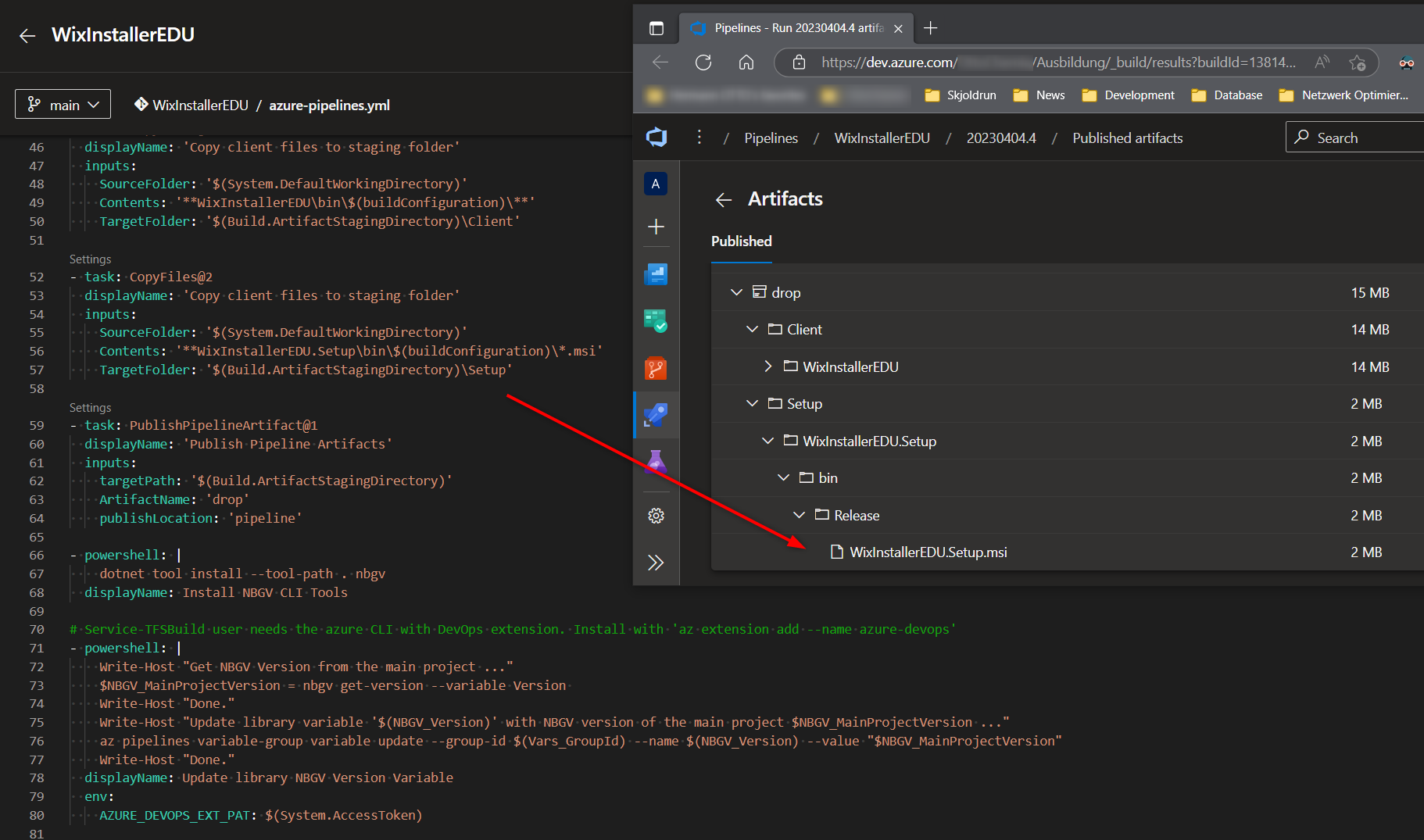
.msisetup itself - Publish the MSI and version marker as pipeline artifacts
The MSI can then be copied to a staging folder and deployed to an admin share.
DevOps Pipeline Example
In MS DevOps and a local build server, the CI pipe calls the VSBuild task to build the solutions.
Set the variables:
1
2
3
4
5
6
7
8
9
10
11
variables:
  - name: SolutionName
    value: 'WixInstallerEDU'
  - name: setup-solution
    value: '**/WixInstallerEDU-Setup.sln'
  - name: solution
    value: '**/*.sln'
  - name: buildPlatform
    value: 'Any CPU'
  - name: buildConfiguration
    value: 'Release'
Then checkout, install needed tools, restore NuGet and build the main solution first:
1
2
3
4
5
6
7
- task: VSBuild@1
  displayName: 'Build Solution'
  inputs:
    solution: '$(solution)'
    platform: '$(buildPlatform)'
    configuration: '$(buildConfiguration)'
    msbuildArgs: '/p:RunWixToolsOutOfProc=true'
After signing the built artifacts, build the Setup solution separately so it harvests the signed files:
1
2
3
4
5
6
7
- task: VSBuild@1
  displayName: 'Build Setup with signed Artifacts'
  inputs:
    solution: '$(setup-solution)'
    platform: '$(buildPlatform)'
    configuration: '$(buildConfiguration)'
    vsVersion: 'latest'
Note: The flag
/p:RunWixToolsOutOfProc=trueis passed to MSBuild in the pipeline to run the WiX tools in a separate process for compatibility with build agents. This works around a deadlock issue that can occur with certain build environments.
Cert Signing preparation
If you want to sign your files and the Setup itself with a certificate in a CI/CD pipeline, it is recommended to separate the setup into its own solution (as done in this project with WixInstallerEDU-Setup.sln).
The product solution takes care of the app and builds it into an output folder (can be the default one).
The Setup solution then contains the WiX project. This doesn’t need project references to the main app project — it uses HarvestDirectory and the path definitions in the .wixproj to find the build output:
1
2
3
4
5
6
7
8
9
10
11
12
13
14
15
16
17
18
19
20
21
22
23
24
25
26
<!-- Reference paths to Product project dir and output dir for harvesting and File Version -->
<PropertyGroup>
    <ProductTargetFramework>net10.0-windows</ProductTargetFramework>
    <ProductTargetDir>..\WixInstallerEDU\bin\$(Configuration)\$(ProductTargetFramework)\</ProductTargetDir>
    <ProductProjectDir>..\WixInstallerEDU\</ProductProjectDir>
    <DefineConstants>
      Product.TargetDir=$(ProductTargetDir);
      Product.ProjectDir=$(ProductProjectDir)
    </DefineConstants>
</PropertyGroup>

<!-- HarvestDirectory replaces heat.exe for auto-harvesting the output directory -->
<ItemGroup>
    <HarvestDirectory Include="$(ProductTargetDir)"
                      ComponentGroupName="ProductComponents"
                      DirectoryRefId="INSTALLFOLDER"
                      PreprocessorVariable="var.Product.TargetDir"
                      SuppressCom="true"
                      SuppressRegistry="true"
                      SuppressRootDirectory="true"
                      Transforms="Transforms.xslt" />
</ItemGroup>

<PropertyGroup>
    <SuppressValidation>true</SuppressValidation>
</PropertyGroup>
This ensures that the setup build process will find the output folder of the product’s main project and injects these paths to the Product.wxs file.
With the SuppressValidation flag, the ICE Checks in the pipeline can be deactivated, especially important for newer pipeline Agents like on Windows Core Servers, which lack some components.
This can be set without worries if you test your MSI package yourself after build and then don’t constantly change its build process afterwards.
The CI/CD Build order is:
- Build the main project with all necessary files for the app
- Sign those files with a cert, e.g. with
signtool.exefrom Windows SDK - Build the Setup solution which harvests the signed files from the first build
- Sign the MSI setup itself
Note: If the sign process takes too long for a large project, you can try excluding the DLLs and only sign your exe files.
Further Information
If you need more MSI functionality or want to look deeper, then check these links:
- WiX Toolset v6 Documentation
- WiX v6 Schema Reference
- HarvestDirectory Documentation
-
[Youtube: Creating Professional Installations with WiX Tips](https://www.youtube.com/watch?v=usOh3NQO9Ms) - Example GitHub for the Youtube Tutorial
- Rob Mensching Installer Components
- Rob Mensching Component Rules 101
Full file contents
wixproj
1
2
3
4
5
6
7
8
9
10
11
12
13
14
15
16
17
18
19
20
21
22
23
24
25
26
27
28
29
30
31
32
33
34
35
36
37
38
39
40
41
42
43
44
45
46
47
48
49
50
51
52
53
54
55
56
57
58
59
60
61
62
63
64
65
66
67
68
69
70
71
72
73
74
75
76
77
78
79
80
81
82
83
84
85
86
87
88
89
90
91
92
93
94
95
96
97
98
99
100
101
102
103
104
105
106
107
108
109
110
<?xml version="1.0" encoding="utf-8"?>
<Project Sdk="WixToolset.Sdk/6.0.2">
<PropertyGroup>
<Configuration Condition=" '$(Configuration)' == '' ">Debug</Configuration>
<Platform Condition=" '$(Platform)' == '' ">x64</Platform>
<OutputName Condition=" '$(SETUP_ENVIRONMENT)' == '' ">WixInstallerEDU.Setup</OutputName>
<OutputName Condition=" '$(SETUP_ENVIRONMENT)' != '' ">WixInstallerEDU.$(SETUP_ENVIRONMENT).Setup</OutputName>
<OutputType>Package</OutputType>
</PropertyGroup>
<PropertyGroup Condition=" '$(Configuration)|$(Platform)' == 'Debug|x86' ">
<OutputPath>bin\$(Configuration)\</OutputPath>
<IntermediateOutputPath>obj\$(Configuration)\</IntermediateOutputPath>
<DefineConstants>Debug;</DefineConstants>
<SuppressPdbOutput>True</SuppressPdbOutput>
</PropertyGroup>
<PropertyGroup Condition=" '$(Configuration)|$(Platform)' == 'Release|x86' ">
<OutputPath>bin\$(Configuration)\</OutputPath>
<IntermediateOutputPath>obj\$(Configuration)\</IntermediateOutputPath>
</PropertyGroup>
<!-- x64 configurations -->
<PropertyGroup Condition=" '$(Configuration)|$(Platform)' == 'Debug|x64' ">
<DefineConstants>Debug</DefineConstants>
<OutputPath>bin\$(Configuration)\</OutputPath>
<IntermediateOutputPath>obj\$(Configuration)\</IntermediateOutputPath>
</PropertyGroup>
<PropertyGroup Condition=" '$(Configuration)|$(Platform)' == 'Release|x64' ">
<OutputPath>bin\$(Configuration)\</OutputPath>
<IntermediateOutputPath>obj\$(Configuration)\</IntermediateOutputPath>
<SuppressPdbOutput>True</SuppressPdbOutput>
</PropertyGroup>
<ItemGroup>
<Content Include="Transforms.xslt" />
</ItemGroup>
<ItemGroup>
<PackageReference Include="WixToolset.Heat" Version="6.0.2" />
</ItemGroup>
<!-- Reference paths to Product project dir and output dir for harvesting and File Version -->
<PropertyGroup>
<ProductTargetFramework>net10.0-windows</ProductTargetFramework>
<!-- Set this to targetFramework of Main Exe project -->
<ProductTargetDir>..\WixInstallerEDU\bin\$(Configuration)\$(ProductTargetFramework)\</ProductTargetDir>
<ProductProjectDir>..\WixInstallerEDU\</ProductProjectDir>
<DefineConstants>
Product.TargetDir=$(ProductTargetDir);
Product.ProjectDir=$(ProductProjectDir)
</DefineConstants>
</PropertyGroup>
<!-- HarvestDirectory replaces heat.exe for auto-harvesting the output directory -->
<ItemGroup>
<HarvestDirectory Include="$(ProductTargetDir)" ComponentGroupName="ProductComponents" DirectoryRefId="INSTALLFOLDER" PreprocessorVariable="var.Product.TargetDir" SuppressCom="true" SuppressRegistry="true" SuppressRootDirectory="true" Transforms="Transforms.xslt" />
</ItemGroup>
<!-- Pre-build: copy environment-specific SomeSettings JSON file to the generic name used by the installer. -->
<PropertyGroup>
<PreBuildEvent>
SET TargetDir=$(SolutionDir)WixInstallerEDU\bin\$(Configuration)\$(ProductTargetFramework)\
REM Check OutputDir exists
IF NOT EXIST "%25TargetDir%25" (
ECHO ERROR: Build output directory not found: %25TargetDir%25 1>&2
ECHO ERROR: Please build the Main project first in $(Configuration) configuration. 1>&2
EXIT /B 1
)
IF DEFINED SETUP_ENVIRONMENT (
IF "%25SETUP_ENVIRONMENT%25"=="BETA" (
SET "EnvLabel=BETA"
SET "SomeSettings=SomeSettings.BETA.json"
SET "AppSettings=appsettings.json"
)
IF "%25SETUP_ENVIRONMENT%25"=="DEVELOPMENT" (
SET "EnvLabel=DEVELOPMENT"
SET "SomeSettings=SomeSettings.Development.json"
SET "AppSettings=appsettings.Development.json"
)
) ELSE (
SET "EnvLabel=PRODUCTION"
SET "SomeSettings=SomeSettings.Production.json"
SET "AppSettings=appsettings.json"
)
REM Check source files exist
SET "HasError=0"
IF NOT EXIST "%25TargetDir%25%25SomeSettings%25" (
ECHO ERROR: [%25EnvLabel%25] Missing file: %25TargetDir%25%25SomeSettings%25 1>&2
SET "HasError=1"
)
IF NOT EXIST "%25TargetDir%25%25AppSettings%25" (
ECHO ERROR: [%25EnvLabel%25] Missing file: %25TargetDir%25%25AppSettings%25 1>&2
SET "HasError=1"
)
IF "%25HasError%25"=="1" (
ECHO ERROR: [%25EnvLabel%25] Environment-specific config files are missing. Please build Main project first. 1>&2
EXIT /B 1
)
REM === Copy to generic names used by the installer ===
IF /I NOT "%25SomeSettings%25"=="SomeSettings.json" (
COPY "%25TargetDir%25%25SomeSettings%25" "%25TargetDir%25SomeSettings.json" /y
)
IF /I NOT "%25AppSettings%25"=="appsettings.json" (
COPY "%25TargetDir%25%25AppSettings%25" "%25TargetDir%25appsettings.json" /y
)</PreBuildEvent>
</PropertyGroup>
<PropertyGroup>
<!-- Deactivate ICE validation. The validation would check the MSI package but needs extra components on the build server. -->
<SuppressValidation>true</SuppressValidation>
</PropertyGroup>
</Project>
Product.wxs
1
2
3
4
5
6
7
8
9
10
11
12
13
14
15
16
17
18
19
20
21
22
23
24
25
26
27
28
29
30
31
32
33
34
35
36
37
38
39
40
41
42
43
44
45
46
47
48
49
50
51
52
53
54
55
56
57
58
59
60
61
62
63
64
65
66
67
68
69
70
71
72
73
74
75
76
77
78
79
80
81
82
83
84
85
86
87
88
89
90
91
92
93
94
95
96
97
98
99
100
101
102
103
104
105
106
107
108
109
110
111
112
113
114
115
116
117
118
119
120
121
122
123
124
125
126
127
128
129
130
131
132
133
134
135
136
137
138
139
140
141
142
143
144
145
146
147
148
149
150
151
152
153
154
155
156
157
158
159
160
161
162
163
164
165
166
167
168
169
170
171
172
173
174
175
176
177
178
179
180
181
182
183
184
185
186
187
188
189
190
191
192
193
194
195
196
197
198
199
200
201
202
203
204
205
<?xml version="1.0" encoding="UTF-8"?>
<Wix xmlns="http://wixtoolset.org/schemas/v4/wxs">

	<!-- define dynamic variables here -->
	<?define ProductManufacturer="Hermann Otto GmbH" ?>
	<?define PackageDescription="WiX Installer EDU Project" ?>
	<?define ProductTargetDir=$(var.Product.TargetDir) ?>
	<?define ProductProjectIconDir=$(var.Product.ProjectDir) ?>
	<?define ProductTargetExe="WixInstallerEDU.exe" ?>
	<?define ProductVersion="!(bind.FileVersion.MainExeFile)" ?>
	<?define ProductHelpLink=https://dev.azure.com/OttoChemie/Ausbildung/_git/WixInstallerEDU?>

	<!-- set environment dependent values -->
	<?ifdef env.SETUP_ENVIRONMENT?>
	<!-- DEVELOPMENT -->
	<?if $(env.SETUP_ENVIRONMENT)=DEVELOPMENT?>
	<?define ProductName="WixInstallerEDU.DEVELOPMENT" ?>
	<?define ShortcutName="WixInstallerEDU - DEVELOPMENT" ?>
	<?define UpgradeCodeGUID="{9682658F-AD3E-414E-BD27-228B3B2B37DD}" ?>
	<?define ApplicationShortcutGUID="{01E478D8-A4FE-4138-B945-6030B774B6BE}" ?>
	<?define DesktopShortcutGUID="{D8F54CD5-8267-4137-8147-7CF706B141F4}" ?>
	<?endif?>
	<!-- BETA -->
	<?if $(env.SETUP_ENVIRONMENT)=BETA?>
	<?define ProductName="WixInstallerEDU.BETA" ?>
	<?define ShortcutName="WixInstallerEDU - BETA" ?>
	<?define UpgradeCodeGUID="{1DBABF4D-4263-4711-A909-561A949F0F75}" ?>
	<?define ApplicationShortcutGUID="{079DE843-1B8C-49F6-8DF7-63E0EE873FF7}" ?>
	<?define DesktopShortcutGUID="{F1D19ABD-4454-46C1-9A4B-B95A75B9DD87}" ?>
	<?endif?>
	<?else?>
	<!-- PRODUCTION -->
	<?define ProductName="WixInstallerEDU" ?>
	<?define ShortcutName="WixInstallerEDU" ?>
	<?define UpgradeCodeGUID="{16F1754E-C22F-4266-81FD-EBB841911566}" ?>
	<?define ApplicationShortcutGUID="{DD9E215A-0BE0-4E63-A02F-48F0D196A474}" ?>
	<?define DesktopShortcutGUID="{101DFDA8-1EAC-4718-B9C4-7B1EE0022323}" ?>
	<?endif?>


	<!-- * Package Code is auto-generated on each build and is ok to change for Major upgrades, only UpgradeCode GUID has to stay for the specific ENV -->
	<Package Name="$(var.ProductName)"
			 Language="1033"
			 Version="$(var.ProductVersion)"
			 Manufacturer="$(var.ProductManufacturer)"
			 UpgradeCode="$(var.UpgradeCodeGUID)"
			 Scope="perMachine">

		<!-- trigger major upgrade https://docs.firegiant.com/wix/schema/wxs/majorupgrade/ with earlier schedule -->
		<MajorUpgrade Schedule="afterInstallInitialize"
					  DowngradeErrorMessage="A newer version of [ProductName] is already installed." />

		<!-- Pack all files, including the cab archive into the MSI -->
		<MediaTemplate EmbedCab="yes" />

		<!-- List of features with their components to be installed -->
		<Feature Id="ProductFeature" Title="$(var.ProductName).Setup" Level="1">
			<ComponentGroupRef Id="MainExeComponentGroup" />
			<ComponentGroupRef Id="ServersettingsJsonComponentGroup" />
			<ComponentGroupRef Id="AppsettingsJsonComponentGroup" />
			<ComponentGroupRef Id="ProductComponents" />
			<ComponentGroupRef Id="ApplicationShortcuts" />
			<ComponentGroupRef Id="ApplicationDesktopShortcut" />
		</Feature>

		<!-- optional additional feature to be installed if chosen -->
		<Feature Id="OptionalFeatures" Title="OptionalFeatures.Setup" Level="2" Description="install optional Features.">
			<ComponentGroupRef Id="OptionalFeaturesComponents" />
		</Feature>

		<!-- Conditional Block checking if env var exists and if it has specific value for changing the Shortcut name -->
		<!-- This only sets a icon for the programmed application UI, not for the shortcut or the start menu -->
		<?ifdef env.SETUP_ENVIRONMENT?>
		<?if $(env.SETUP_ENVIRONMENT)=DEVELOPMENT?>
		<Icon Id="AppIcon" SourceFile="$(var.ProductProjectIconDir)Resources\Dev.ico" />
		<Property Id="ARPPRODUCTICON" Value="AppIcon" />
		<?endif?>
		<?if $(env.SETUP_ENVIRONMENT)=BETA?>
		<Icon Id="AppIcon" SourceFile="$(var.ProductProjectIconDir)Resources\Beta.ico" />
		<Property Id="ARPPRODUCTICON" Value="AppIcon" />
		<?endif?>
		<?else?>
		<Icon Id="AppIcon" SourceFile="$(var.ProductProjectIconDir)Resources\Prod.ico" />
		<Property Id="ARPPRODUCTICON" Value="AppIcon" />
		<?endif?>

		<!-- Provide information links to be displayed in "Programs and Features" -->
		<Property Id="ARPURLINFOABOUT"  Value="$(var.ProductHelpLink)" />
		<Property Id="ARPHELPLINK"      Value="$(var.ProductHelpLink)" />
		<Property Id="ARPURLUPDATEINFO" Value="$(var.ProductHelpLink)" />
	</Package>

	<!-- Directories -->
	<Fragment>
		<!-- Program Files Folder -->
		<!-- StandardDirectory uses the 64-bit folder because Platform is x64 -->
		<!-- https://docs.firegiant.com/wix/schema/wxs/standarddirectory/ -->
		<StandardDirectory Id="ProgramFiles64Folder">
			<Directory Id="MANUFACTURERFOLDER" Name="!(bind.property.Manufacturer)">
				<Directory Id="INSTALLFOLDER" Name="!(bind.property.ProductName)" />
			</Directory>
		</StandardDirectory>
		<!-- Start Menu Folder -->
		<StandardDirectory Id="ProgramMenuFolder">
			<Directory Id="ApplicationProgramsFolder" Name="!(bind.property.ProductName)" />
		</StandardDirectory>
		<!-- Desktop Shortcut -->
		<StandardDirectory Id="DesktopFolder" />
	</Fragment>

	<!-- Provide application and uninstall shortcuts in the start menu -->
	<Fragment>
		<ComponentGroup Id="ApplicationShortcuts">
			<Component Id="ApplicationShortcuts"
					   Guid="$(var.ApplicationShortcutGUID)"
					   Directory="ApplicationProgramsFolder">
				<Shortcut Id="ApplicationShortcut"
						  Name="$(var.ShortcutName)"
						  Description="Starts $(var.ShortcutName)"
						  Target="[INSTALLFOLDER]$(var.ProductTargetExe)"
						  WorkingDirectory="INSTALLFOLDER" />
				<Shortcut Id="UninstallShortcut"
						  Name="Uninstall !(bind.property.ProductName)"
						  Description="Uninstalls !(bind.property.ProductName)"
						  Target="[System64Folder]msiexec.exe"
						  Arguments="/x [ProductCode]" />
				<RegistryValue Root="HKCU"
							   Key="Software\!(bind.property.Manufacturer)\!(bind.property.ProductName)"
							   Name="ApplicationShortcutsInstalled"
							   Type="integer"
							   Value="1"
							   KeyPath="yes" />
				<RemoveFolder Id="ApplicationProgramsFolder" On="uninstall" />
			</Component>
		</ComponentGroup>
	</Fragment>

	<!-- Create a Desktop Shortcut -->
	<Fragment>
		<ComponentGroup Id="ApplicationDesktopShortcut">
			<Component Id="ApplicationDesktopShortcut"
					   Guid="$(var.DesktopShortcutGUID)"
					   Directory="DesktopFolder">
				<Shortcut Id="ApplicationDesktopShortcut"
						  Name="$(var.ShortcutName)"
						  Description="$(var.ShortcutName)"
						  Target="[INSTALLFOLDER]$(var.ProductTargetExe)"
						  WorkingDirectory="INSTALLFOLDER" />
				<RegistryValue Root="HKCU"
							   Key="Software\!(bind.property.Manufacturer)\!(bind.property.ProductName)"
							   Name="ApplicationDesktopShortcutInstalled"
							   Type="integer"
							   Value="1"
							   KeyPath="yes" />
			</Component>
		</ComponentGroup>
	</Fragment>

	<!-- manually added exe file to get the version number -->
	<!-- other components will be auto-harvested by HarvestDirectory at build time -> ProductComponents component group -->
	<Fragment>
		<ComponentGroup Id="MainExeComponentGroup" Directory="INSTALLFOLDER">
			<Component Id="MainExeComponent" Guid="{F63DFDB3-6C46-46E0-97FA-729C035A5B6F}">
				<File Id="MainExeFile" KeyPath="yes" Source="$(var.ProductTargetDir)$(var.ProductTargetExe)" />
			</Component>
		</ComponentGroup>
	</Fragment>

	<!-- manually added optional feature components -->
	<!-- all other components are auto-harvested by HarvestDirectory at build time -> ProductComponents component group -->
	<Fragment>
		<ComponentGroup Id="OptionalFeaturesComponents" Directory="INSTALLFOLDER">
			<Component Id="Feature01Comp" Guid="{C3A936A9-EF50-491D-9A91-BFF37345BE7B}">
				<File Id="Feature01File" KeyPath="yes" Source="$(var.ProductTargetDir)Feature01.txt" />
			</Component>
			<Component Id="Feature02Comp" Guid="{041FF6F3-237C-4D44-A72B-ED7BFE983DA0}">
				<File Id="Feature02File" KeyPath="yes" Source="$(var.ProductTargetDir)Feature02.txt" />
			</Component>
			<Component Id="Feature03Comp" Guid="{CA6A45D8-F3D5-4C9C-979A-550A4E9451E3}">
				<File Id="Feature03File" KeyPath="yes" Source="$(var.ProductTargetDir)Feature03.txt" />
			</Component>
		</ComponentGroup>
	</Fragment>

	<!-- SomeSettings.json: environment-specific file copied by PreBuildEvent.
	     All SomeSettings.*.json variants are excluded from auto-harvesting via Transform.xslt. -->
	<Fragment>
		<ComponentGroup Id="ServersettingsJsonComponentGroup" Directory="INSTALLFOLDER">
			<Component Id="SomeSettingsJsonComp" Guid="{8B5A3F12-4B7C-4D9E-A2F1-3C8D7E6B5A4F}">
				<File Id="SomeSettingsJsonFile" KeyPath="yes" Source="$(var.ProductTargetDir)SomeSettings.json" />
			</Component>
		</ComponentGroup>
	</Fragment>

	<!-- appsettings.json: base configuration file.
	     All appsettings.*.json variants are excluded from auto-harvesting via Transform.xslt. -->
	<Fragment>
		<ComponentGroup Id="AppsettingsJsonComponentGroup" Directory="INSTALLFOLDER">
			<Component Id="AppsettingsJsonComp" Guid="{2F3A8B5C-1D4E-4F6A-9B2C-7E8D3A5F1B4C}">
				<File Id="AppsettingsJsonFile" KeyPath="yes" Source="$(var.ProductTargetDir)appsettings.json" />
			</Component>
		</ComponentGroup>
	</Fragment>

</Wix>
Transforms.xslt — Transform file to exclude files from harvesting
1
2
3
4
5
6
7
8
9
10
11
12
13
14
15
16
17
18
19
20
21
22
23
24
25
26
27
28
29
30
31
32
33
34
35
36
37
38
39
40
41
42
43
44
45
46
47
48
49
50
51
52
53
54
55
56
57
58
<?xml version="1.0" encoding="utf-8"?>
<xsl:stylesheet
    xmlns:xsl="http://www.w3.org/1999/XSL/Transform"
    xmlns:wix="http://wixtoolset.org/schemas/v4/wxs"
    xmlns="http://wixtoolset.org/schemas/v4/wxs"

    version="1.0"
    exclude-result-prefixes="xsl wix">

	<xsl:output method="xml" indent="yes" omit-xml-declaration="yes" />
	<xsl:strip-space elements="*" />

	<!--
    Find all <Component> elements with <File> elements whose Source attribute ends in ".exe" and tag them with the "ExeToRemove" key.
    The main .exe is added manually in Product.wxs (MainExeComponentGroup), so it must be excluded from harvesting.

    Note: The WiX HarvestDirectory extension (WixToolset.Heat) only supports XSLT 1.0, so we cannot use
    `ends-with( wix:File/@Source, '.exe' )`. Instead we use a `substring` workaround
    (see https://github.com/wixtoolset/issues/issues/5609).
    -->
	<!-- Get the last 4 characters of a string using `substring( s, len(s) - 3 )`, it uses -3 and not -4 because XSLT uses 1-based indexes, not 0-based indexes. -->
	<xsl:key
        name="ExeToRemove"
        match="wix:Component[ substring( wix:File/@Source, string-length( wix:File/@Source ) - 3 ) = '.exe' ]"
        use="@Id" />

	<!-- Remove all SomeSettings*.json files. The correct environment-specific SomeSettings.json is added manually in Product.wxs.
	     The PreBuildEvent copies SomeSettings.<ENV>.json to SomeSettings.json before harvesting. -->
	<xsl:key
        name="SomeSettingsToRemove"
        match="wix:Component[ contains( wix:File/@Source, 'SomeSettings.' ) ]"
        use="@Id" />

	<!-- Remove all appsettings*.json files. The correct environment-specific appsettings.json is added manually in Product.wxs. -->
	<xsl:key
        name="appsettingsToRemove"
        match="wix:Component[ contains( wix:File/@Source, 'appsettings.' ) ]"
        use="@Id" />

	<!-- Remove .pdb files -->
	<xsl:key
        name="PdbToRemove"
        match="wix:Component[ substring( wix:File/@Source, string-length( wix:File/@Source ) - 3 ) = '.pdb' ]"
        use="@Id" />

	<!-- By default, copy all elements and nodes into the output... -->
	<xsl:template match="@*|node()">
		<xsl:copy>
			<xsl:apply-templates select="@*|node()" />
		</xsl:copy>
	</xsl:template>

	<!-- ...but if the element has a filtered key then don't render anything (i.e. removing it from the output) -->
	<xsl:template match="*[ self::wix:Component or self::wix:ComponentRef ][ key( 'ExeToRemove', @Id ) ]" />
	<xsl:template match="*[ self::wix:Component or self::wix:ComponentRef ][ key( 'SomeSettingsToRemove', @Id ) ]" />
	<xsl:template match="*[ self::wix:Component or self::wix:ComponentRef ][ key( 'appsettingsToRemove', @Id ) ]" />
	<xsl:template match="*[ self::wix:Component or self::wix:ComponentRef ][ key( 'PdbToRemove', @Id ) ]" />
</xsl:stylesheet>