xUnit Testing
xUnit.net is one of the most widely used unit testing frameworks in the .NET ecosystem. It is a free, open source, community-focused testing tool for C#, F#, and Visual Basic. With multiple packages consistently ranking in the top 50 most downloaded NuGet packages, xUnit significantly outpaces alternatives like NUnit and MSTest in adoption. It is part of the .NET Foundation and the default test framework in many .NET project templates.
Setup
Creating a test project
Using the .NET CLI:
1
2
3
4
5
# Install xUnit v3 templates (if not already installed)
dotnet new install xunit.v3.templates

# Create a new test project
dotnet new xunit3 --language C# -n MyProject.Tests
Or with the classic xUnit v2 approach:
1
dotnet new xunit -n MyProject.Tests
Adding a reference to the project under test
1
2
cd MyProject.Tests
dotnet add reference ../MyProject/MyProject.csproj
Running tests
1
2
3
4
5
6
7
8
# Run all tests
dotnet test

# Run with detailed output
dotnet test --verbosity normal

# Run a specific test class or method by filter
dotnet test --filter "FullyQualifiedName~MyTestClass"
Core Concepts
xUnit uses attributes to define tests:
| Attribute | Purpose |
|---|---|
[Fact] |
A test method that takes no parameters |
[Theory] |
A parameterized test method that runs once per data set |
[InlineData] |
Provides inline parameter values for a [Theory] |
[MemberData] |
Provides parameter values from a property or method |
[ClassData] |
Provides parameter values from a class implementing IEnumerable<object[]> |
Fact - A simple test
1
2
3
4
5
6
7
8
9
10
11
12
13
14
15
public class CalculatorTests
{
    [Fact]
    public void Add_TwoPositiveNumbers_ReturnsCorrectSum()
    {
        // Arrange
        var calculator = new Calculator();

        // Act
        var result = calculator.Add(2, 3);

        // Assert
        Assert.Equal(5, result);
    }
}
Theory - Parameterized tests with InlineData
1
2
3
4
5
6
7
8
9
10
11
12
13
14
15
16
public class CalculatorTests
{
    [Theory]
    [InlineData(2, 3, 5)]
    [InlineData(0, 0, 0)]
    [InlineData(-1, 1, 0)]
    [InlineData(int.MaxValue, 0, int.MaxValue)]
    public void Add_VariousInputs_ReturnsExpectedResult(int a, int b, int expected)
    {
        var calculator = new Calculator();

        var result = calculator.Add(a, b);

        Assert.Equal(expected, result);
    }
}
Common Assertions
1
2
3
4
5
6
7
8
9
10
11
12
13
14
15
16
17
18
19
20
21
22
23
24
25
26
27
28
29
30
31
32
33
34
35
36
37
// Equality
Assert.Equal(expected, actual);
Assert.NotEqual(unexpected, actual);

// Boolean
Assert.True(condition);
Assert.False(condition);

// Null checks
Assert.Null(obj);
Assert.NotNull(obj);

// String checks
Assert.Contains("substring", actualString);
Assert.StartsWith("prefix", actualString);
Assert.Matches("regex-pattern", actualString);

// Collection checks
Assert.Empty(collection);
Assert.Contains(item, collection);
Assert.All(collection, item => Assert.True(item > 0));
Assert.Single(collection);

// Type checks
Assert.IsType<ExpectedType>(obj);
Assert.IsAssignableFrom<BaseType>(obj);

// Exception checks
Assert.Throws<ArgumentNullException>(() => SomeMethod(null));
var ex = Assert.Throws<InvalidOperationException>(() => SomeMethod());
Assert.Equal("Expected message", ex.Message);

// Async exception checks
await Assert.ThrowsAsync<ArgumentException>(async () => await SomeAsyncMethod());

// Range
Assert.InRange(actual, low, high);
Test Lifecycle and Shared Context
By default, xUnit creates a new instance of the test class for each test method. This ensures test isolation without manual cleanup.
Constructor and Dispose for per-test setup/teardown
1
2
3
4
5
6
7
8
9
10
11
12
13
14
15
16
17
18
19
20
21
22
23
24
public class DatabaseTests : IDisposable
{
    private readonly DatabaseConnection _connection;

    public DatabaseTests()
    {
        // Runs before each test
        _connection = new DatabaseConnection();
        _connection.Open();
    }

    [Fact]
    public void Query_ReturnsResults()
    {
        var results = _connection.Query("SELECT 1");
        Assert.NotEmpty(results);
    }

    public void Dispose()
    {
        // Runs after each test
        _connection.Close();
    }
}
IClassFixture - Shared context across tests in one class
Use when setup is expensive and can be shared across all tests in a class:
1
2
3
4
5
6
7
8
9
10
11
12
13
14
15
16
17
18
19
20
21
22
23
24
25
26
27
28
29
30
public class DatabaseFixture : IDisposable
{
    public DatabaseConnection Connection { get; }

    public DatabaseFixture()
    {
        Connection = new DatabaseConnection();
        Connection.Open();
        // Seed test data ...
    }

    public void Dispose() => Connection.Close();
}

public class ProductTests : IClassFixture<DatabaseFixture>
{
    private readonly DatabaseFixture _fixture;

    public ProductTests(DatabaseFixture fixture)
    {
        _fixture = fixture;
    }

    [Fact]
    public void GetProduct_ReturnsProduct()
    {
        var product = _fixture.Connection.Query("SELECT * FROM Products LIMIT 1");
        Assert.NotNull(product);
    }
}
ICollectionFixture - Shared context across multiple test classes
1
2
3
4
5
6
7
8
9
10
11
12
13
14
15
16
17
18
19
20
21
22
[CollectionDefinition("Database collection")]
public class DatabaseCollection : ICollectionFixture<DatabaseFixture> { }

[Collection("Database collection")]
public class ProductTests
{
    private readonly DatabaseFixture _fixture;
    public ProductTests(DatabaseFixture fixture) => _fixture = fixture;

    [Fact]
    public void Test1() { /* use _fixture */ }
}

[Collection("Database collection")]
public class OrderTests
{
    private readonly DatabaseFixture _fixture;
    public OrderTests(DatabaseFixture fixture) => _fixture = fixture;

    [Fact]
    public void Test2() { /* use _fixture */ }
}
Naming Conventions
A common and widely adopted naming pattern for test methods is:
1
MethodName_Scenario_ExpectedBehavior
Examples:
1
2
3
4
5
6
7
8
9
10
11
[Fact]
public void Add_TwoPositiveNumbers_ReturnsSum() { }

[Fact]
public void Withdraw_InsufficientFunds_ThrowsException() { }

[Fact]
public void GetUser_InvalidId_ReturnsNull() { }

[Fact]
public void Parse_EmptyString_ThrowsArgumentException() { }
For class names, mirror the class under test with a Tests suffix:
Calculator→CalculatorTestsOrderService→OrderServiceTests
For project naming, use a .Tests suffix on the project under test:
MyProject→MyProject.Tests
Best Practices
- Arrange, Act, Assert (AAA): Structure every test in three sections — setup, execute, verify. This keeps tests readable and consistent.
- One assertion per concept: Each test should verify one logical behavior. Multiple asserts are fine if they verify the same logical outcome.
- Test isolation: Never let one test depend on the result or side effects of another. xUnit creates a new class instance per test, which helps by default.
- Avoid test logic: Tests should not contain
if,switch,for, or other control flow. A test that needs branching should be split into multiple tests. - Use descriptive names: Test names should clearly communicate what is tested and what is expected without reading the test body.
- Prefer
[Theory]over copy-pasting[Fact]s: When multiple tests differ only in their input data, parameterize them. - Don’t test private methods directly: Test the public API. If a private method is complex enough to warrant its own tests, consider extracting it into its own class.
- Use fakes/mocks sparingly: Prefer testing with real implementations where feasible. Use mocking libraries like Moq or NSubstitute for external dependencies like databases or HTTP clients.
- Keep tests fast: Unit tests should run in milliseconds. Slow tests discourage frequent execution.
Skipping Tests
1
2
3
4
5
6
[Fact(Skip = "Reason for skipping this test")]
public void SomeTest() { }

[Theory(Skip = "API not yet available")]
[InlineData(1)]
public void SomeParameterizedTest(int value) { }
Output and Diagnostics
xUnit suppresses Console.WriteLine by default. Use ITestOutputHelper for test output:
1
2
3
4
5
6
7
8
9
10
11
12
13
14
15
16
public class DiagnosticsTests
{
    private readonly ITestOutputHelper _output;

    public DiagnosticsTests(ITestOutputHelper output)
    {
        _output = output;
    }

    [Fact]
    public void SomeTest()
    {
        _output.WriteLine("Diagnostic message visible in test results");
        Assert.True(true);
    }
}
Advanced: Complex Test Data with MemberData
Sometimes you need more complex parameter data to test in xUnit tests Theories and InlineData. For this scenario you can use MemberData with objects containing the more complex parameters as shown below.
Method to test
The method should check, if a given time is within a timespan between given periodStart and periodEnd parameters.
1
2
3
4
5
6
7
8
9
10
11
12
13
public bool CheckIfIsWithinWorkingHours(DateTime dateTimeNow, string periodStart, string periodEnd)
{
    var timeOfDayNow = dateTimeNow.TimeOfDay;
    if ((timeOfDayNow > DateTime.ParseExact(periodStart, "HH:mm", CultureInfo.InvariantCulture).TimeOfDay)
        && (timeOfDayNow < DateTime.ParseExact(periodEnd, "HH:mm", CultureInfo.InvariantCulture).TimeOfDay))
    {
        return true;
    }
    else
    {
        return false;
    }
}
Test with MemberData
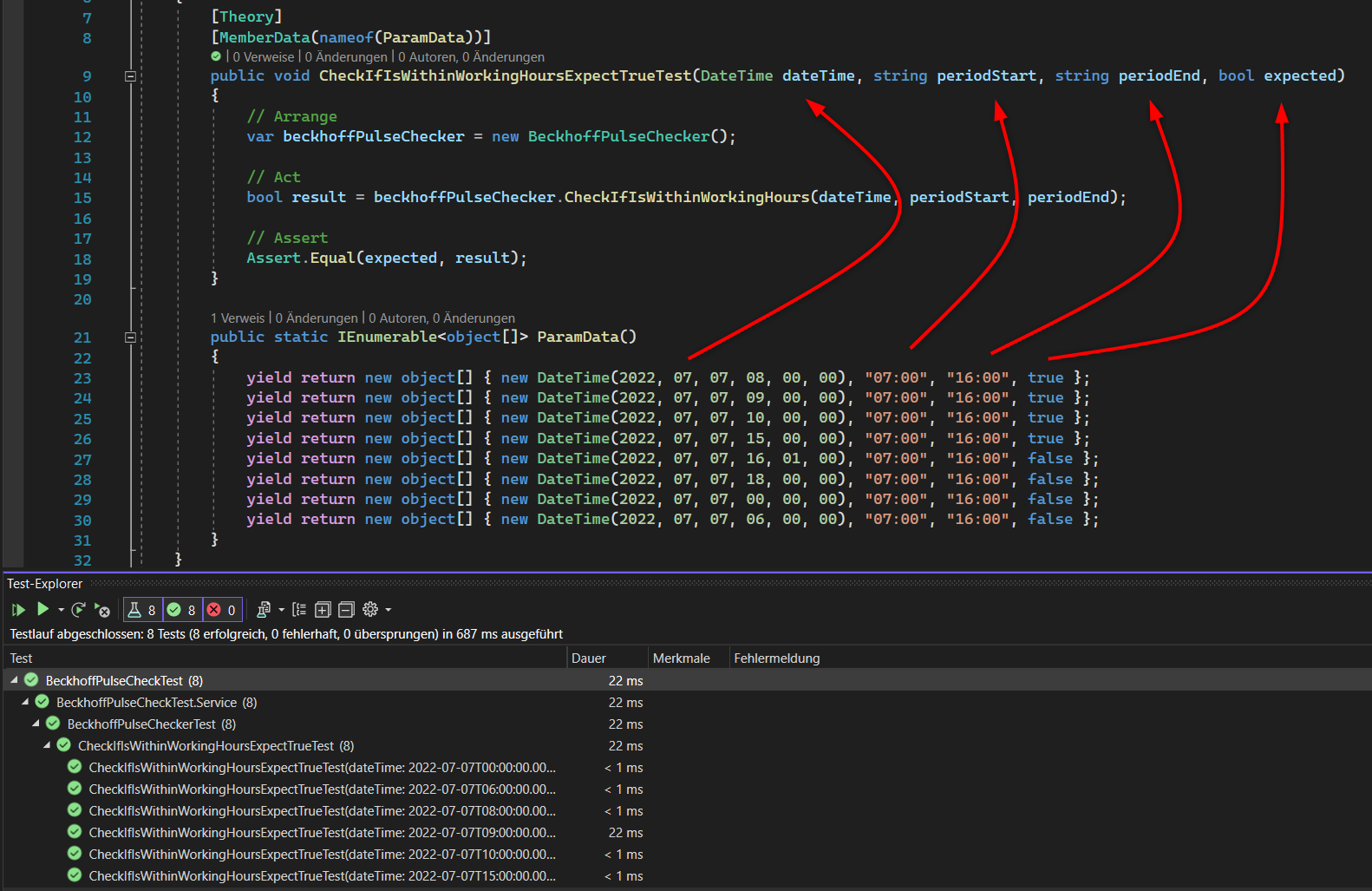
The upper Method can be tested with a xUnit Theory, but InlineData cannot handle DateTime objects besides the other wanted parameters. Therefore we can use the call for [MemberData(nameof(ParamData))] and the definition of a static Method named ParamData, wich returns objects with the needed parameters:
1
2
3
4
5
6
7
8
9
10
11
12
13
14
15
16
17
18
19
20
21
22
23
24
25
26
27
28
public class BeckhoffPulseCheckerTest
    {
        [Theory]
        [MemberData(nameof(ParamData))]
        public void CheckIfIsWithinWorkingHoursExpectTrueTest(DateTime dateTime, string periodStart, string periodEnd, bool expected)
        {
            // Arrange
            var beckhoffPulseChecker = new BeckhoffPulseChecker();

            // Act
            bool result = beckhoffPulseChecker.CheckIfIsWithinWorkingHours(dateTime, periodStart, periodEnd);

            // Assert
            Assert.Equal(expected, result);
        }

        public static IEnumerable<object[]> ParamData()
        {
            yield return new object[] { new DateTime(2022, 07, 07, 08, 00, 00), "07:00", "16:00", true };
            yield return new object[] { new DateTime(2022, 07, 07, 09, 00, 00), "07:00", "16:00", true };
            yield return new object[] { new DateTime(2022, 07, 07, 10, 00, 00), "07:00", "16:00", true };
            yield return new object[] { new DateTime(2022, 07, 07, 15, 00, 00), "07:00", "16:00", true };
            yield return new object[] { new DateTime(2022, 07, 07, 16, 01, 00), "07:00", "16:00", false };
            yield return new object[] { new DateTime(2022, 07, 07, 18, 00, 00), "07:00", "16:00", false };
            yield return new object[] { new DateTime(2022, 07, 07, 00, 00, 00), "07:00", "16:00", false };
            yield return new object[] { new DateTime(2022, 07, 07, 06, 00, 00), "07:00", "16:00", false };
        }
    }
You can mix datatypes and make really complex parameter combinations and easily call the testmethod with them.